

Application speed is a huge factor that makes a difference in user experience. Apps that take a long time to load or feel sluggish will quickly find themselves uninstalled. This is why optimizing the React Native load speed is crucial. Although React Native is a great way for developers to create apps quickly on both the Android and iOS platforms, it can be prone to performance issues if the app is not sufficiently optimized.
One of the negative thoughts people have by default about React Native apps is that they are slow in performance. Nevertheless, the heavy bundle sizes, unneeded re-renders, and bulky third-party libraries are where most performance problems arise. React Native apps, with the proper techniques, can be made to perform well and load instantaneously. In this blog, we will examine some simple and realistic ways to maximise performance and enhance the speed and responsiveness of your application.
Common Causes of Slow React Native Applications
Identifying the causes of React Native performance issues is the first step in correcting them.
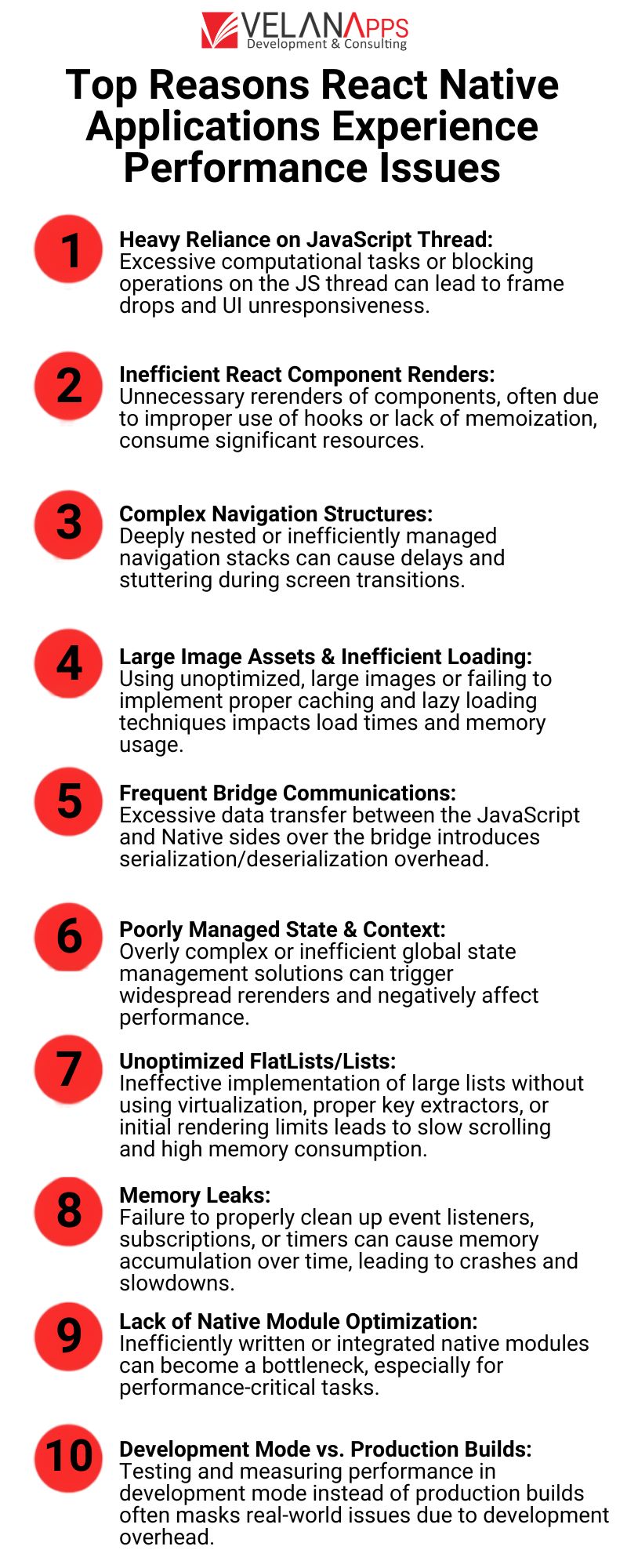
Large Bundle Size
JavaScript bundles are necessary for React Native apps. A large bundle will lead to longer app initialisation and rendering time. The inclusion of unwanted libraries, the presence of unused code, and heavy dependencies can all contribute to a prolonged application startup time.
Excessive Re-renders
While React’s component-based approach is robust, bad state management can lead to unnecessary re-renders of components. If lots of data changes and their state updates, the loop of rendering the new UI takes CPU time and depletes the overall responsive UI experience.
Unoptimised Third-Party Libraries
While third-party packages can help you develop quickly, they may bring in performance overhead. Certain libraries aren’t mobile-friendly or contain large dependencies that bloat the bundle.
Spotting these issues early saves time and allows the developer to work on a solid plan to enhance performance.
Optimise App Startup Time
When it comes to startup time, the initial impression is crucial. Proper React Native startup optimisation ensures fast and seamless loading for your app.
Reduce JavaScript Bundle Size
We can also reduce our bundle size by minifying the code, removing any unused imports and enabling a tree-shaking process. You can break your code into multiple slices and load them when you want. Do not include heavy libraries for simple things; make a lightweight solution yourself, and it will be better.
Taking advantage of tools such as Metro Bundler and freeing your app of unnecessary modules goes a long way in decreasing the load time.
Enable Hermes Engine
Hermes is a JavaScript engine for React Native apps that is open-source, Java-based, and optimised for performance. This lets it accomplish reducing the app size, faster startup times, and a smaller memory footprint. Enabling Hermes often results in clear improvements in launch time for apps.
This fact is because Hermes precompiles JavaScript into bytecode, saving time on runtime parsing and improving overall startup performance. Switching to Hermes is low-hanging fruit and can bring immediate benefits for many applications.
Improve UI Rendering Performance
Battery is followed by battery; the flow of UI interactions is key to user satisfaction. In this case, some React Native UI optimisation, smooth scrolling, animations, and screen transitions, even correct React Native UI, do the trick.
Memoisation and PureComponent
Memoisation caches the expensive computation results so the components are not unnecessarily re-rendered. Using React. memo for functional components and PureComponent for class components guarantees for us that props will only cause a re-render when they’re actually changed.
This saves rendering cycles and lets the app behave more responsively, particularly on intricate screens.
FlatList Optimisation
Most mobile apps have lists, so the unoptimised ones are laggy. FlatList is a performant interface that allows the rendering of big arrays of data, as it renders the items lazily.
Further improvements include:
- Setting initialNumToRender wisely
- Using keyExtractor correctly
- Implementing getItemLayout for fixed-height items
These tweaks go a long way toward maximising scroll performance and reducing your memory footprint.
Optimise Images and Assets
Slow load speed is often due to heavy images and poor asset management. React Native image optimisation is crucial for enhancing performance.
Lazy Loading Images
Lazy loading prevents the browser from rendering images that are out of the viewport until the user scrolls to those images. It helps reduce the memory consumption and speeds up the startup.
Also, to avoid losing the smoothness of your user experience, you can use placeholder images while your full-resolution image downloads.
Use Optimised Formats
Significantly reduce file size without quality professional work through compressing images and using modern formats, e.g., WebP. Do not keep images large in the app bundle if they can be fetched dynamically.
Also, since images are cached locally, they are not downloaded again, saving bandwidth and making load times faster.
Reduce Native Bridge Overhead
A bridge allows React Native to communicate between JavaScript and the native code. Excessive communication can slow performance. To be honest, the React Native bridge optimisation can be done properly, and the interaction between layers is seamless.
Minimise Bridge Calls
There is some overhead with each JavaScript-to-native module call. By cutting down on extraneous interactions with the bridge, we can help with responsiveness. Use batch operations if possible. Things like doing 20 small calls rather than one bigger one.
Instead of updating UI elements one by one, batch the updates together to reduce the frequency of communication, for example.
Use Native Modules Efficiently
If there are tasks that are critical to performance, I think you should implement them in the native code instead. Native performance is also more suitable for heavy animations, complex calculations, or operations that rely on specific device capabilities.
This technique offloads heavy processes to native modules and frees up space for JavaScript to run faster.
React Native Performance Monitoring Tools
Optimisation without measurement is guesswork. React Native performance tools—Understand any single bottleneck and measure how well (or badly) your fixes have helped.
Flipper
Flipper is another debugging platform that aims to assist developers with inspecting network requests, performance metrics, and logs. It is useful to understand memory and UI rendering behaviours.
React DevTools
React DevTools is utilised to help track the hierarchy of different components and to see if there are any re-renders of different components that a user does not need. Profiler allows you to see how long each component takes to render, which makes it clearer to optimise slow parts.
Firebase
Firebase Performance Monitoring allows you to see how fast your app starts, how fast your network is and discover crash reports in real time. This data allows developers to identify performance trends and resolve any issues that impact the experience of users.
These tools not only help you treat the symptoms but also ensure consistency in the performance improvement of processes over time instead of being a one-time fix.
Conclusion
Boosting the load speed in your React Native apps is not rocket science by itself, but like everything in life, you need to pay attention to the details. You can address many of the common performance issues by decreasing the bundle size, optimising the UI rendering, improving image handling, and minimizing bridge calls.
The right React Native performance tools not only locate the problem but are also effective in eliminating it. This means that, with React Native startup optimisation and the overall quality of the app, there is a point at which it feels fast and stable. If planned properly and if the performance is monitored, React Native apps can be quick and experienced with ease by users.
FAQs
What could be making my React Native application slow to load?
Large bundle sizes, excessive rerendering, oversized images, or unoptimised third-party libraries cause slow loading. Speed can be enhanced the moment you realise these React Native Performance issues.
What is the answer to React Native loading times being faster?
If you want a fast React Native app, do the following: first, downsize your JavaScript bundle; second, turn on the Hermes engine; third, optimise your pictures; and finally, try to remove unnecessary bridge calls.
What does React Native startup optimisation mean?
Startup optimisation in React Native is all about reducing the loading time of an app when you open it. Things like enabling Hermes, cleaning unused code, and asset optimisation.
How does FlatList improve performance?
The great thing about the FlatList is that it renders only the visible items to make the rendering process fast and performance-efficient rather than loading the entire list into the DOM at once. It assists with React Native UI performance and smooth scrolling.
Browse Topics
Categories