 By
kingsly jebaraj
By
kingsly jebaraj Best Plugins for WordPress in Your Day-to-Day Life
Plugins are used to extend the functionality of a website, for example, search engine optimisation, optimising performance, more security, and eCommerce features like WooCommerce. They allow website owners to personalize and enhance their sites without having to dive deep into coding. WordPress plugins in 2026 introduce smarter automation, stronger security, and faster optimisation tools for websites.
Importance of Plugins in Website Performance
These plugins improve the functionality of such a website. By increasing load speed, improving SEO visibility and security, or automating significant tasks. Plugins are used by business owners to enhance customer experience and to ease website management.
WordPress plugins: meaning. When we think of WordPress plugins, please be aware that they are functions that a site is able to add without having the need to write code. If you run a blog, business site or e-commerce store, plugins make it easy for you to manage your website.
How they are extending core WordPress features
A simple WordPress site only utilises standard features. These functionalities can be augmented with plugins that bring SEO tools, contact forms, analytics, backups, membership systems, and eCommerce capabilities to the mix.
If you are questioning why use WordPress plugins, the answer is that making your website grow faster is very simple due to them saving time and development effort.
WordPress Plugins: A Summary of the Best
Let us quickly list the popular WordPress plugins used in 2026:
- SEO → Yoast SEO / Rank Math
- Speed → WP Rocket
- Security → Wordfence
- eCommerce → WooCommerce
- Backup → UpdraftPlus
- Image Optimization → Smush
- Forms → WPForms
- Analytics → MonsterInsights
These are all categorized as essential plugins for many WordPress websites because they fulfill core functions you won’t be able to build your website without.
How to make good use of this list.
Nobody has to use every plugin, not least not on all sites. Choose plugins based on your goals and the size and requirements of your audience. A personal blog can do with a few SEO and backup plugins, while a business website will need security plugins and an.
How to Choose the Right Plugins for Your Website?
Selecting the right plugins can help address performance concerns and compatibility. Matching Plugins to Business Goals
Your plugin choices should support your website goals.
- Bloggers need SEO and content optimization tools
- Business websites require security and contact form plugins
- Online stores need payment and inventory management plugins
- Agencies may need workflow and client management tools
Learning how to choose WordPress plugins carefully can improve both performance and long-term scalability.
Free vs Premium Considerations
Free plugins are useful for basic functionality, while premium plugins often provide advanced support and features.
Free plugins are ideal for:
- Small websites
- Beginners
- Basic optimization
Premium plugins are better for:
- Large websites
- eCommerce businesses
- Advanced customization
- Dedicated support
Features, dependability, and cost should always be balanced in a good plugin selection guide.
Compatibility and Performance Factors
Before installing a plugin:
- Check compatibility with your WordPress version
- Review update frequency
- Read user reviews
- Test website speed impact
- Ensure plugin developer credibility
Poorly optimised plugins can dramatically slow down websites.
Essential WordPress Plugins for Every Website
1. SEO optimisation tools to rank better:
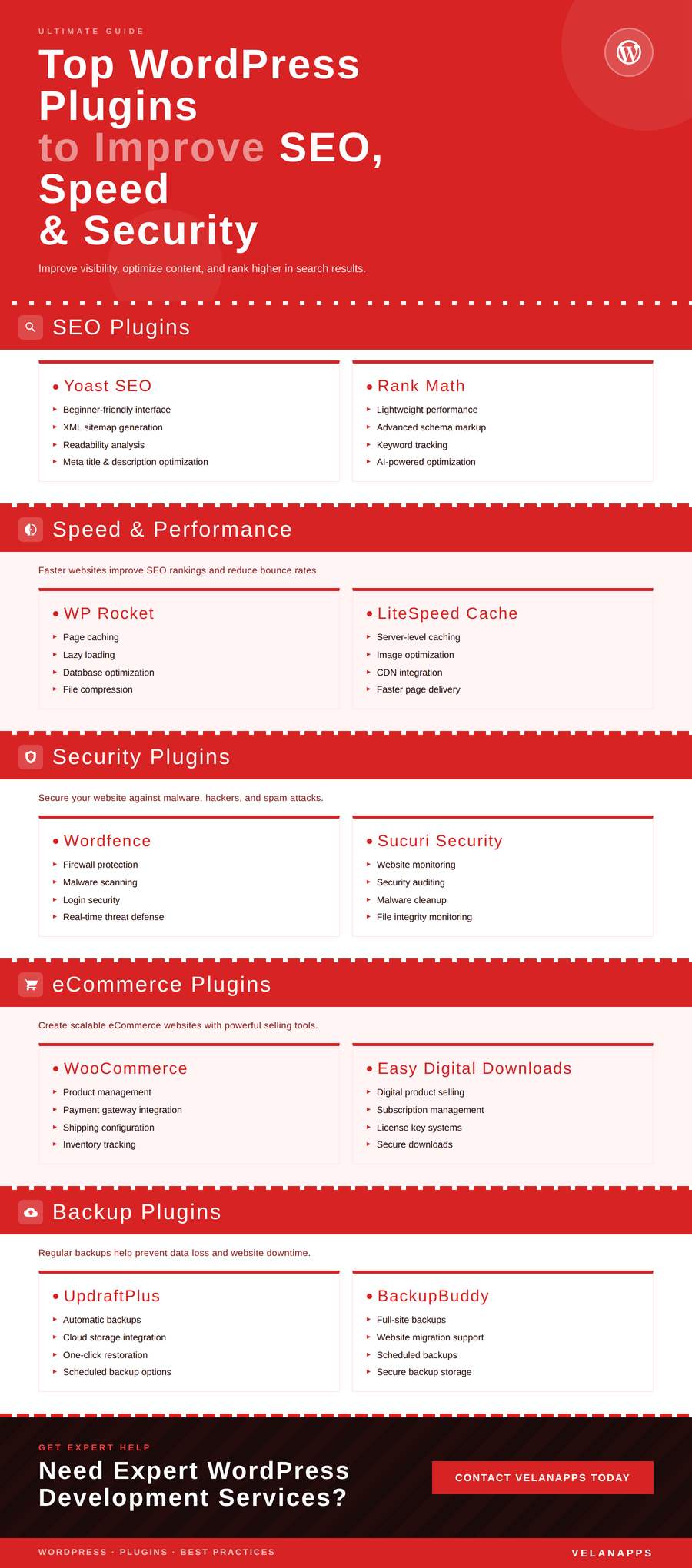
A huge challenge again is why websites put so much effort into dispersing the information; in 2026 it will continue here. Yoast SEO and Rank Math are the two most popular WordPress search engine optimisation plugins on the market. Yoast SEO
Yoast SEO
- Easy beginner interface
- XML sitemap generation
- Readability analysis
- Meta-optimisation
Rank Math
- Lightweight performance
- Advanced schema support
- Keyword tracking
- AI-assisted optimization
Both tools help optimise metadata and improve content visibility and rankings.
2. Use Website Load Speed Improvement Plug-Ins
User experience and search engine optimisation rankings can be impacted by how quickly a web page loads.
WP Rocket
- Page caching
- Lazy loading
- Database optimization
- File compression
LiteSpeed Cache
- Server-level caching
- Image optimization
- CDN support
These plugins reduce loading delays and improve overall performance.
3. Security Plugins to Protect Your Website
Cybersecurity threats continue increasing, making WordPress security plugins essential.
Wordfence
- Firewall protection
- Malware scanning
- Login security
Sucuri Security
- Website monitoring
- Security auditing
- Malware cleanup
Security plugins are great to protect against hacking attempts, spam attacks, and unauthorised access.
4. eCommerce Plugins for Web Shops
WordPress, WooCommerce, and other associated extensions are utilised to create many online shops.
WooCommerce
- Product management
- Payment gateway integration
- Shipping settings
- Inventory tracking
Easy Digital Downloads
- Digital product selling
- Subscription support
- License systems
These WordPress eCommerce plugins are the best for scalable online businesses.
5. Backup & Maintenance Plugins
Website backups are very important for restoring data and security reasons.
UpdraftPlus
- Automatic backups
- Cloud storage integration
- Easy restoration
BackupBuddy
- Full-site backups
- Migration support
- Backups on schedule
WordPress backup plugins you can rely on help keep your website data safe from accidental loss.
WordPress Plugin Comparison
Ease of Use and Features
The plugins focus on varying user needs.
- There are thousands of plug-ins available that will help serve the needs of many users; however, each plug-in has specific functions to provide.
- Yoast is easy for newbies to use.
- Rank Math offers advanced SEO controls
- WP Rocket provides easy speed optimization
- Wordfence delivers detailed security monitoring
WordPress Plugin Comparison Based on Usability and Performance Pricing and Free Plan. As with many plugins, there are both free versions and premium plans.
How to Outsource WordPress Development to India
Pricing and Free Versions
Many plugins offer both free and premium plans.
| Plugin | Free Version | Premium Features |
| Yoast SEO | Yes | Advanced SEO tools |
| Rank Math | Yes | AI optimization |
| WP Rocket | No | Full caching suite |
| Wordfence | Yes | Real-time firewall |
Best Use Cases
- Bloggers → Yoast SEO
- Agencies → Rank Math
- eCommerce stores → WooCommerce
- Security-focused sites → Wordfence
Recommended Plugins Based on Different Use Cases
For Beginners and Small Websites
Perfect Plugins for Beginners often narrow down to simplicity and easy setup.
Recommended:
- Yoast SEO
- WPForms
- UpdraftPlus
For Bloggers and Content Creators
Content-heavy websites benefit from:
- Rank Math
- Smush
- MonsterInsights
They enhance SEO, image optimisation and analytics tracking.
For Business and Agency Sites
Plugins for business websites should prioritise lead generation and security.
Recommended:
- Wordfence
- Elementor
- HubSpot CRM
For eCommerce Stores
Online stores often require:
- WooCommerce
- Stripe Payment Gateway
- WP Rocket
These plugins improve customer experience and checkout performance.
How to Hire a WooCommerce Developer: Costs, Skills & Best Practices
Common Mistakes When Installing WordPress Plugins
A large number of plugins installed
The most common error made with plug-ins for WordPress is installing too many plugins!
Too many plugins may
- Slow down loading times
- Cause compatibility conflicts
- Increase security risks
Ignoring Updates and Compatibility
Outdated plugins create vulnerabilities and performance problems. Always keep plugins updated.
Choosing Poorly Optimized Tools
Low-quality plugins can create WordPress performance issues, especially on shared hosting environments.
How Plugins Affect Website Speed and SEO Performance
Impact on Loading Time
Heavy plugins can increase server requests, database usage, and script loading. This negatively impacts plugins and site speed.
Effects on the Ranking of Search
Google is one of many search engines; website speed and user experience are key ranking signals for Google. Slow websites may experience lower visibility in search results.
Good plugins improve the following:
- Page speed
- Mobile responsiveness
- Structured data
- Technical SEO
This directly supports WordPress SEO performance.
Best Practices for Optimization
- Install only necessary plugins
- Use lightweight tools
- Monitor speed regularly
- Remove inactive plugins
- Enable caching and image compression
Managing and Updating Plugins Efficiently
Keeping Plugins Updated
Updates on a regular basis enhance security and compatibility.
Make sure to test updates on staging websites before applying them directly live.
Track Performance
Make use of tools such as GTmetrix or PageSpeed Insights to monitor how plugins affect performance.
Removing Unused Plugins
Unused plugins still create security risks. To properly manage WordPress plugins, remove inactive and unnecessary tools regularly.
Good plugin maintenance helps maintain website stability and speed.
FAQs
How many plugins should a WordPress site use?
There is no fixed number. 10–25 Plugins is a good range for most websites, depending on what your features of the site are.
Are free plugins reliable?
A lot of free plugins are good options, so long as the developer is reputable and consistently keeps up on updates.
Do plugins slow down websites?
Poorly coded and excessive plugins slow websites down, while optimised ones typically improve site functionality with few performance problems.
How do I safely update plugins?
Back up your website before you update your plugins. When possible, try out new plugin versions in a “test” version of your site (a.k.a. “staging”) before putting them into production.
How do WordPress plugins slow down websites?
Some plugins consume many resources, but caching and optimisation plugins can really speed things up.