 By
kingsly jebaraj
By
kingsly jebaraj Automating Flutter deployments really cuts out all those hours spent on boring, repetitive release stuff. You no longer need to manually build, sign, and upload the apps to the App Store & Google Play Store. Just install Fastlane and create a proper CI/CD pipeline, and you’re fine. Once all of this is up and running, deploying a new release becomes as simple as the following:
Once you’ve got it all running, pushing out a new release is as easy as:
fastlane iOS release
Fastlane Android release. In this article, we will learn how to create a Flutter CI/CD pipeline from scratch using Fastlane (for both Android and iOS platforms) and GitHub Actions (our automation tool), along with TestFlight app uploading and Play Store deployments as well as secret management for secure and sustainable automation practices. Set up CI/CD for Flutter using fastlane.
Why Set Up CI/CD for Flutter with Fastlane?
Manual Flutter deployments usually involve:
- Building APK/AAB or IPA files
- Managing signing certificates
- Uploading builds to app stores
- Updating build numbers
- Running tests
- Handling release tracks
Such processes can result in 30–60 minutes per release.
This means a proper Flutter CI/CD pipeline automates everything:
- Faster releases
- Fewer deployment errors
- Consistent builds
- Automated testing
- One-click publishing
- Better team collaboration
One of the most popular tools for mobile deployment automation, Fastlane runs effortlessly with Flutter, Android, and iOS.
What Is Fastlane?
Fastlane is an open-source tool that enables the deployment of iOS and Android apps. This automates some of the repetitive tasks that you do every time, such as uploading builds to TestFlight, publishing apps to Google Play, and releasing them.
- Building Android AAB/APK files
- Building iOS IPA files
- Managing signing certificates
- Uploading builds to TestFlight
- Publishing apps to Google Play
- Running tests
- Capturing App Store screenshots
- Managing version numbers
Fastlane integrates with:
- GitHub Actions
- Bitrise
- GitLab CI/CD
- CircleCI
Prerequisites
Tools required: Before going to set up Fastlane automation of Flutter, first make sure your machine has the correct tools installed.
| Requirement | Purpose | Verify |
| Flutter SDK 3. x+ | Build Flutter apps | flutter -version |
| Ruby 2.5+ | Required for Fastlane | ruby –version |
| Xcode 14+ | Build iOS apps | xcode-select -version |
| Android Studio / SDK | Android builds | flutter doctor |
| Apple Developer Account | iOS publishing | developer.apple.com |
| Google Play Console Access | Android publishing | play.google.com/console |
Flutter App Deployment Pipeline Using Fastlane and GitHub Actions
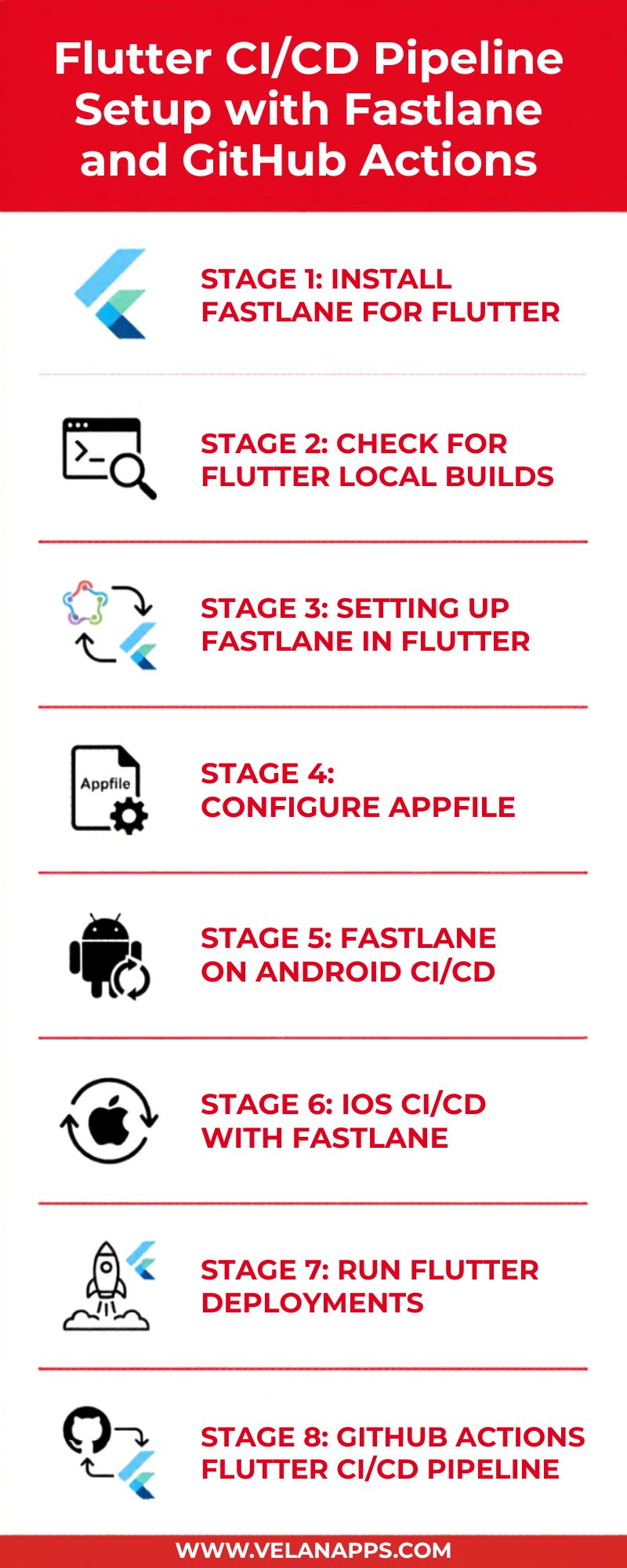
Stage 1: Install Fastlane for Flutter
Install Fastlane
You can install Fastlane using RubyGems or Homebrew:
RubyGems (Recommended)
gem install fastlane # Option 1
Homebrew (macOS Only)
brew install fastlane # Option 2 (macOS only)
Use gem install fastlane for CI/CD runners and automated environments.
Configure Flutter Environment Variables
Find Flutter SDK Path
which flutter
Example output:
/Users/username/development/flutter/bin/flutter
Your Flutter SDK path is:
Set FLUTTER_ROOT
Edit your shell configuration file depending on your terminal
| Shell | Config File | Command to Edit |
| zsh (default) | ~/.zshrc | open -e ~/.zshrc |
| bash | ~/.bash_profile | open -e ~/.bash_profile |
Then, add this line at the end of the file:
export FLUTTER_ROOT=/Users/username/development/flutter
export PATH=”$FLUTTER_ROOT/bin:$PATH”
Replace the path with your actual Flutter SDK location.
Your environment is correctly set up if the Flutter Doctor is successful.
/Users/username/development/flutter/
Stage 2: Check for Flutter Local Builds
Make sure local builds are working fine before configuring automation.
Android Build
flutter build appbundle
iOS Build
flutter build ipa
If local builds fail, they are going to fail in the CI/CD pipeline too due to the same reasons.
Stage 3: Setting Up Fastlane in Flutter
Android
cd android && fastlane init
iOS
cd ios && fastlane init
Fastlane creates:
android/fastlane/
Appfile
Fastfile
Pluginfile
ios/fastlane/
Appfile
Fastfile
Matchfile
Stage 4: Configure Appfile
Android Appfile
# android/fastlane/Appfile
json_key_file("path/to/play-store-credentials.json")
package_name("com.yourcompany.yourapp")
iOS Appfile
# ios/fastlane/Appfile

apple_id("[email protected]")

app_identifier("com.yourcompany.yourapp")

team_id("YOUR_TEAM_ID")

itc_team_id("YOUR_ITC_TEAM_ID")
Stage 5: Fastlane on Android CI/CD
For deployment on Google Play we use the keyword ‘upload_to_play_store’ in Fastlane.
Create a Google Play Service Account
1. Enable API Access
In the Google Play Console:
Setup → API Access
Link a Google Cloud project.
2. Create Service Account
In Google Cloud Console:
- Enable Google Play Android Developer API
- Create Service Account
- Generate JSON key
- Download the JSON credentials file
3. Grant Permissions
In Play Console:
Users & Permissions → Invite User
Assign the service account:
Release Manager role
Validate Play Store JSON Key
fastlane run validate_play_store_json_key json_key:/path/to/key.json
Android Fastfile Example
default_platform(:android)

platform :android do

desc "Deploy Android Beta"

lane :beta do

  sh("flutter build appbundle --release")

  upload_to_play_store(

    track: "beta",

    aab: "../build/app/outputs/bundle/release/app-release.aab"

  )

end

desc "Deploy Android Production"

lane :release do

  sh("flutter build appbundle --release")

  upload_to_play_store(

    track: "production",

    aab: "../build/app/outputs/bundle/release/app-release.aab"

  )

end

end
Android Release Signing Configuration
Before uploading Android builds to the Play Store, you must configure release signing properly. Without signing configuration, Play Store deployments will fail.
Generate an Android Keystore
Run:
keytool -genkey -v \
-keystore upload-keystore.jks \
-keyalg RSA \
-keysize 2048 \
-validity 10000 \
-alias upload
This generates:
- upload-keystore.jks
Store this file securely and never commit it to source control.
Create key.properties
Inside the android/ directory create:
storePassword=YOUR_STORE_PASSWORD
keyPassword=YOUR_KEY_PASSWORD
keyAlias=upload
storeFile=../upload-keystore.jks
Configure Gradle Signing
Open:
android/app/build.gradle
Add:
def keystoreProperties = new Properties()
def keystorePropertiesFile = rootProject.file(“key.properties”)
if (keystorePropertiesFile.exists()) {
keystoreProperties.load(new FileInputStream(keystorePropertiesFile))
}
android {
signingConfigs {
release {
keyAlias keystoreProperties[‘keyAlias’]
keyPassword keystoreProperties[‘keyPassword’]
storeFile file(keystoreProperties[‘storeFile’])
storePassword keystoreProperties[‘storePassword’]
}
}
buildTypes {
release {
signingConfig signingConfigs.release
}
}
}
CI/CD Secret Management
For GitHub Actions or other CI/CD platforms:
- Store keystore files securely
- Store passwords as encrypted secrets
- Recreate keystore files during CI runtime
Never commit:
- .jks
- .keystore
- passwords
- signing configs
Verify Signed Release Build
Run:
flutter build appbundle –release
If successful, your Android app is properly signed and ready for deployment to the Play Store.
Stage 6: iOS CI/CD with Fastlane
Setting Up iOS Certificates and Provisioning Profiles
Secure Apple Credentials
Older Fastlane setups commonly used:
export FASTLANE_PASSWORD=”YourApplePassword”
However, modern iOS CI/CD pipelines should use an App Store Connect API Key instead of Apple ID passwords wherever possible.
Why use API Keys?
- More secure and reliable
- Works better with Apple 2FA enabled accounts
- Recommended by Apple and Fastlane
- Better suited for CI/CD automation environments
Create an App Store Connect API Key
- Open App Store Connect
- Navigate to:[Text Wrapping Break]Users and Access → Keys
- Create a new API Key
- Download the .p8 key file
- Note the following values:
- Key ID
- Issuer ID
- .p8 file
Store Credentials Securely
Never commit:
- .p8 files
- passwords
- certificates
- provisioning profiles
Store them securely using CI/CD secrets such as the following:
- GitHub Actions Secrets
- GitLab CI Variables
- Bitrise Secrets
Example Fastlane Configuration
app_store_connect_api_key(
key_id: ENV[“APP_STORE_CONNECT_KEY_ID”],
issuer_id: ENV[“APP_STORE_CONNECT_ISSUER_ID”],
key_filepath: “./AuthKey.p8”
)
GitHub Actions Secret Example
env:

  APP_STORE_CONNECT_KEY_ID: ${{ secrets.APP_STORE_CONNECT_KEY_ID }}

  APP_STORE_CONNECT_ISSUER_ID: ${{ secrets.APP_STORE_CONNECT_ISSUER_ID }}
Using App Store Connect API Keys provides a more stable and production-ready authentication method for automated iOS deployments.
macOS/Linux
export FASTLANE_PASSWORD=”YourApplePassword”
Windows PowerShell
setx FASTLANE_PASSWORD “YourApplePassword”
Never commit passwords to source control.
Use CI secrets instead.
Generate Profiles and Certificates for iOS
Distribution Certificate
In the Apple Developer Portal:
Certificates → +
Create an iOS Distribution Certificate.
Provisioning Profile
Create:
Profiles → App Store
Download and install the .mobileprovision file.
Configure in Xcode
Open:
ios/Runner.xcworkspace
Navigate to:
Runner → Signing & Capabilities
Select:
- Team
- Certificate
- Provisioning profile
Install CocoaPods Dependencies for iOS
Flutter iOS projects depend on CocoaPods to manage native iOS libraries and plugins.
Before running Fastlane or GitHub Actions for iOS builds, make sure CocoaPods dependencies are installed correctly.
Install CocoaPods
Install CocoaPods globally:
sudo gem install cocoapods
Verify installation:
pod –version
Install iOS Dependencies
Navigate to the iOS folder:
cd ios
pod install
If you face outdated dependency issues, run:
pod repo update
Common CocoaPods Issues
Pod Installation Failed
Try:
pod deintegrate
pod install
Architecture or Cache Issues
Run:
flutter clean
rm -rf Pods
rm -rf Podfile.lock
pod install
CI/CD Best Practice
In GitHub Actions or CI/CD pipelines, always run:
cd ios && pod install
before building the iOS app.
This ensures all Flutter plugins and native iOS dependencies are installed correctly during automated builds.
Use Fastlane Match (Recommended)
Fastlane Match securely stores certificates in a private Git repository.
Initialize Match:
fastlane match init
Generate App Store certificates:
fastlane match appstore
Generate development certificates:
fastlane match development
Fastlane Match prevents signing conflicts across developers and CI runners.
iOS Fastfile Example
default_platform(:ios)

platform :ios do

desc "Upload to TestFlight"

lane :beta do

  build_app(

    scheme: "Runner",

    export_method: "app-store"

  )

  upload_to_testflight

end

desc "Release to App Store"

lane :release do

 build_app(

    scheme: "Runner",

    export_method: "app-store"

  )

  upload_to_app_store

end

end
Stage 7: Run Flutter Deployments
Android Deployment
flutter build appbundle
cd android
fastlane beta
fastlane release
iOS Deployment
flutter build ios –release –no-codesign
cd ios
fastlane beta
fastlane release
Stage 8: GitHub Actions Flutter CI/CD Pipeline
Use GitHub Actions to automate deployments. on every push, you can perform a deployment.
Create:
.github/workflows/flutter-deploy.yml
Example Workflow
name: Flutter CI/CD with Fastlane
on:
push:
branches:
- main
jobs:
deploy-android:
runs-on: ubuntu-latest
steps:
- uses: actions/checkout@v3
- uses: subosito/flutter-action@v2
with:
flutter-version: “3.x”
- run: flutter pub get
- run: gem install fastlane
- run: flutter build appbundle
- run: cd android && fastlane beta
env:
– name: Decode Play Store Key
run: echo “$PLAY_STORE_JSON_KEY” > android/play-key.json
json_key_file(“play-key.json”)
deploy-ios:
runs-on: macos-latest
steps:
- uses: actions/checkout@v3
- uses: subosito/flutter-action@v2
with:
flutter-version: “3.x”
- run: flutter pub get
- run: gem install fastlane
- run: flutter build ipa
- run: cd ios && fastlane beta
env:
FASTLANE_PASSWORD: ${{ secrets. FASTLANE_PASSWORD }}
MATCH_PASSWORD: ${{ secrets. MATCH_PASSWORD }}
Apple’s platform restrictions require iOS builds to run on macOS machines.
Common Fastlane Flutter Errors
| Error | Cause | Fix |
| ‘flutter’ command not found | FLUTTER_ROOT missing | Set environment variables |
| Invalid Play Store JSON | API access issue | Recreate service account |
| iOS signing error | Wrong certificate | Run fastlane match appstore |
| TestFlight upload fails | 2FA issue | Use App-Specific Password |
| Build number conflict | Duplicate build number | Use an incremented build number. |
| Gradle build failed | Missing signing config | Check keystore setup |
CI/CD Best Practices for Flutter
Security
- Store credentials as encrypted CI secrets
- Never commit JSON or .p12 files
- Use Fastlane Match for iOS signing
- Rotate service account keys regularly
Reliability
Bundler setup Use:
gem install bundler
bundle init
gem “fastlane”
bundle install
bundle exec fastlane beta
instead of:
fastlane
Also:
- Pin Fastlane versions in Gemfile
- Run Flutter test
- Separate beta and production lanes
Add Automated Build Numbers
lane: beta do
increment_build_number(
build_number: ENV[“GITHUB_RUN_NUMBER”]
)
build_app(scheme: “Runner”)
upload_to_testflight
end
This prevents duplicate build number errors.
Fastlane vs GitHub Actions
| Feature | Fastlane | GitHub Actions |
| Mobile deployment | Yes | No |
| Workflow orchestration | Limited | Yes |
| Store uploads | Yes | No |
| CI runners | No | Yes |
GitHub Actions handles CI orchestration.
Fastlane handles mobile deployment automation.
You typically use both together.
Flutter CI/CD Setup Checklist
| Task | Status |
| Flutter SDK installed | ☐ |
| Fastlane installed | ☐ |
| FLUTTER_ROOT configured | ☐ |
| Local builds working | ☐ |
| Fastlane initialized | ☐ |
| Appfile configured | ☐ |
| Play Store API configured | ☐ |
| iOS certificates installed | ☐ |
| Fastlane Match configured | ☐ |
| GitHub Actions workflow created | ☐ |
Conclusion
Only iOS builds should run on macOS due to an Apple platform restriction.
A complete Flutter CI/CD pipeline gives you:
- Faster deployments
- Fewer release errors
- Automated store publishing
- Consistent build environments
- Better team collaboration
After configuring Fastlane, your deployment pipeline can automatically build, sign, test, and distribute your Flutter app. It could, for example, automatically build and test, sign, and, therefore, distribute new versions of the app to TestFlight or Google Play every single time you bump up that version number.
FAQs
1. Why would developers choose Fastlane and GitHub Actions for their Flutter apps?
GitHub Actions acts as the CI/CD platform with runners, workflow triggers, and automation, whereas Fastlane takes care of Flutter building, code signing, app store uploads, as well as deployment automation. While GitHub Actions is arranging the pipeline, Fastlane is transporting mobile deployments.
2. Can I use Fastlane for Flutter on Windows?
Fastlane supports macOS, Linux, and Windows, but iOS builds require macOS because of Xcode. Apple restrictions require iOS builds to use macOS. When we build Android on Linux and macOS, we rarely deploy Fastlane to Windows. Usually, GitHub Actions runs android builds on ubuntu-latest along with iOS builds running on macos-latest.
3. Is an Apple Developer Program account necessary for Fastlane iOS deployment?
Indeed. You must have a paid Apple Developer Program account if you want to distribute apps via TestFlight or the App Store. Distribution certificates and provisioning profiles are only available with a paid account.
4. How to deal with Apple 2FA in CI/CD?
Don’t put your Apple username and password to direct use. Create an App Store.
Connect API key, download the .p8 certificate file, and store it securely in your CI/CD environment. Fastlane will be able to authenticate this way without being interrupted by 2FA. This way, Fastlane can authenticate without any 2FA disruptions.
5. How long does Flutter CI/CD deployment take?
Typical CI times vary depending on project size and cache usage.
Deployment usually takes around 10–30 minutes, depending on build size and CI runner performance.
Android: 5–12 minutes
iOS: 15, 30+ minutes, as Xcode builds are usually heavy, and in addition to that, Apple processing will make it even longer.
6. Does Fastlane allow me to create and deploy iOS and Android builds simultaneously?
Indeed. You are able to set up distinct GitHub Actions jobs for the deployment of iOS and Android and get them to operate concurrently on separate cloud runners, thus saving time.
7. Should I use Fastlane Match with Flutter?
Fastlane Match stores iOS certificates and provisioning profiles within an encrypted private Git repository and automatically distributes them to developer machines and CI runners.
8. Why does it pass running locally but fail on GitHub Actions with the same build?
Common reasons include:
Missing secrets, such as keystores or API credentials
Different Flutter, Java, or Xcode versions
File name capitalization differences, which work fine locally will fail in CI/CD environments; this can be a headache for your project.
9. If I use Fastlane, will I be able to deploy my Flutter app for both iOS and Android?
Absolutely, you can. You can see that the deployments for Android and iOS are separated in GitHub Actions, and with PR pushes to main, we trigger both jobs.
GitHub Actions separate jobs for the deployment of Android and iOS, and PR pushes to the main branch are triggers for the simultaneous execution of both jobs.
10. How to auto-increment the build number?
The easiest method is to use your Git commit count or CI run number.
Example:
lane: deploy do
build_num = number_of_commits()
Dir.chdir “../…” do
sh(“flutter build appbundle –build-number=#{build_num}”)
sh(“flutter build ipa –build-number=#{build_num}”)
end
end
You can also use GITHUB_RUN_NUMBER with increment_build_number in Fastlane to generate unique build numbers automatically.
11. Is Fastlane free to use for Flutter CI/CD?
Yes. Fastlane is free and open-source. Additional costs may include:
Google Play Developer account
Apple Developer Program membership
CI/CD runner usage costs
| Task | Platform | Done? |
| Install Flutter SDK and verify flutter doctor passes | Both | ☐ |
| Install Ruby and verify gem install fastlane works | Both | ☐ |
| Set and verify the FLUTTER_ROOT environment variable | Both | ☐ |
| Confirm flutter build appbundle and flutter build ipa work locally | Both | ☐ |
| Run fastlane init inside the android/ and ios/ directories | Both | ☐ |
| Configure the Appfile with the correct package name and bundle ID | Both | ☐ |
| Create and validate the Google Service Account JSON key | Android | ☐ |
| Install Apple Distribution Certificate and Provisioning Profile | iOS | ☐ |
| Configure Fastlane Match (recommended) | iOS | ☐ |
| Create beta and release lanes in the Fastfile for both platforms | Both | ☐ |
| Store all credentials as encrypted CI environment variables | CI/CD | ☐ |
| Create, test, and automate deployment using GitHub Actions | CI/CD | ☐ |