 By
kingsly jebaraj
By
kingsly jebaraj WordPress is popular, making it a well-known target for hackers, malware, and spam to exploit. Every business needs to keep its data safe, so if you run a blog, a business website, or an online store, you need to know how to keep your WordPress site safe.
The Ultimate WordPress Security Guide: Quick WordPress Website Protection
The easiest way to secure a WordPress website is by keeping core files and plugins updated, using strong passwords with two-factor authentication, installing a security plugin, enabling a firewall, and creating regular backups.
These basic actions help reduce hacking attempts, malware infections, and unauthorized access. Understanding WordPress security basics can help website owners keep their websites safe and stable.
What Makes WordPress Security Important for Every Site
Hackers exploit our weaknesses, older plugins, weak passwords, or bad hosting security.
Even small websites will be attacked if no one cares about security.
Who Needs These Security Measures Most
These security practices are important for:
- Business websites
- eCommerce stores
- Blogs with regular traffic
- Educational websites
- Agencies managing client websites
Website security is an essential requirement for any online presence.
Essential WordPress Security Steps
Here is a basic WordPress security checklist:
- Update WordPress core, themes and plugins
- Power up WordPress login protection and two-factor authentication.
- Make use of a firewall and malware scanner
- Back up your website regularly
These are the simple, important steps you need to take that lessen the chance of a cyberattack.
Use Checklist Perfectly
Prioritise the tasks that are most critical to you, such as updates, passwords, and backups. Next, it simplifies things by saying they should have basic protections like firewalls and malware monitoring.
To keep things safe, go over a WordPress security checklist on a regular basis.
Threats and Security Risks for WordPress Websites
Most of the WordPress security threats occur due to bad maintenance of your website or poor settings related to security.
Brute Force Login Attempts
Hackers try thousands of options in an attempt to breach websites.
Weak passwords make these kinds of assaults easier.
Malware and Backdoor Injections
Malware can enter websites through unsafe plugins or themes. It may steal data, damage the website, or redirect visitors.
Backdoors allow hackers to access the website again even after passwords are changed.
Plugin and Theme Vulnerabilities
Old or poorly coded plugins can create website vulnerabilities.
The use of trusted plugins will help in performing regular updates to improve website security.
Regularly updating the plugin used on the website and utilising the recommended or trusted plugins are very good steps towards enhancing security and preventing malware attacks.
Protect Your WordPress Website Now: Hire WordPress Security Developers Today.
A Business WordPress Security Checklist In 2026 [Step-By-Step]
Following the WordPress security checklist steps will be of help in securing your website.
Maintain Right Core, Themes and Plugins Up-To-Date
Updates fix security issues and improve website safety.
Best practices:
- Turn on automatic updates
- Delete unused plugins and themes
- Use trusted plugins and themes
Enforce login credentials and access control.
A strong password protects your website from hackers.
Tips:
- Use strong passwords.
- Avoid “admin” as a username.
- Enable two-factor authentication
- Only provide admin access to trusted people
These steps help secure WordPress website systems.
Install a Security Plugin and Enable Firewall
Security plugins help detect malware and block harmful traffic.
Your website is further protected by a firewall.
Set Up Automated Backups
If something goes wrong, backups aid in the restoration of your website.
Include:
- Automatic backups
- Cloud storage
- Daily or weekly backups
Use SSL and a Secure Hosting Environment
SSL protects visitor data. Secure hosting also improves website protection and monitoring.
Reliable hosting is important for website security.
Secure a WordPress Website Using Tools
Different website security tools can help strengthen WordPress protection and improve overall website safety.
Security Plugins for Malware Protection
Popular WordPress security plugins provide the following:
- Malware scanning
- Login protection
- Firewall support
- Security alerts
- File monitoring
Website owners can manage threats more efficiently with these solutions.
Backup Solutions for Data Recovery
Backup tools simplify website recovery after data loss or attacks.
Good backup systems should support:
- Automatic scheduling
- Quick restoration
- Remote storage options
Monitoring and Firewall Tools
The monitoring tools can detect suspicious activities, such as unusual logins to specific locations or files. Firewalls can block malicious traffic before it reaches the site.
WordPress Website Security Guide 2026: Easy Ways to Protect Your Site
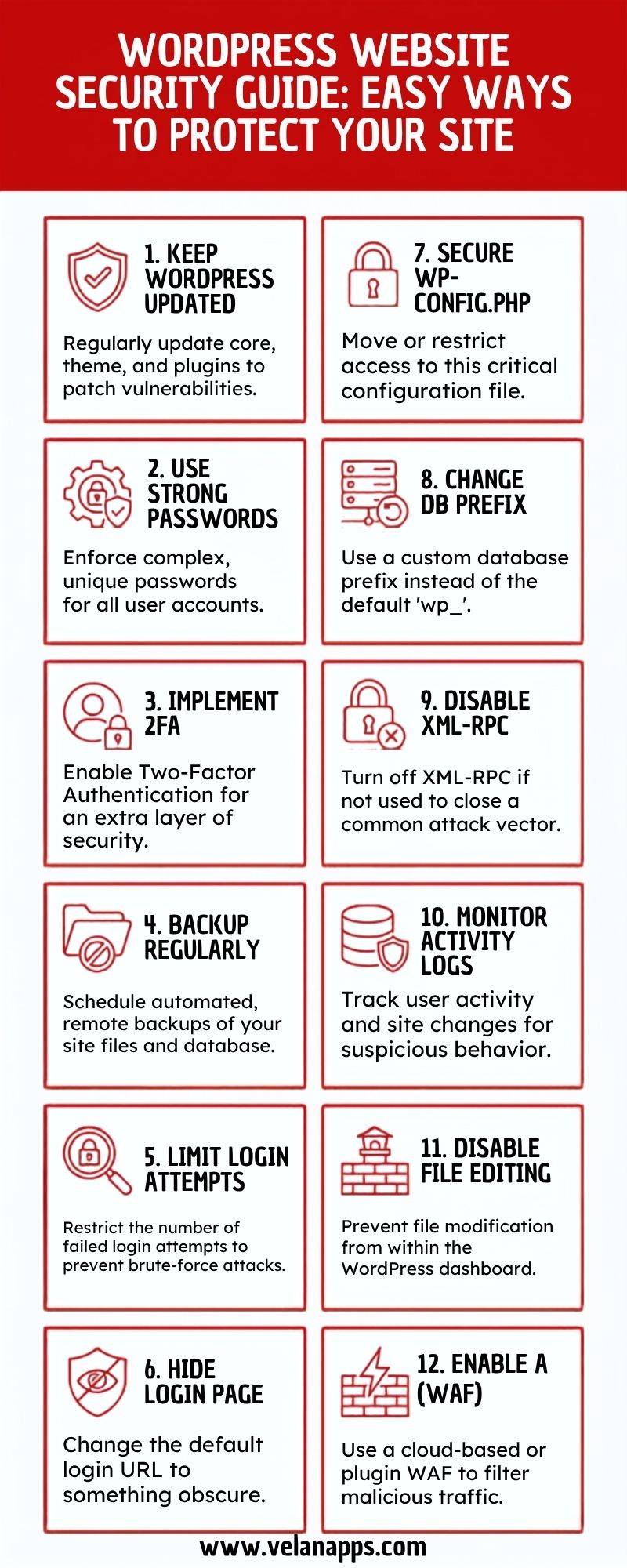
This strategy makes it harder to fend off sophisticated WordPress security threats.
Beyond the standard WordPress security, additional protection is required for websites with sensitive data or significant traffic.
Disabling XML-RPC and File Editing
It makes XML-RPC disabled to be used in cyberattacks.
WordPress Dashboard
Disable file editing in the WordPress dashboard to block any unpermitted modifications by website owners.
Limit login attempts
This aids in mitigating brute force attacks.
Many security plugins can block suspicious users or IP addresses for a short time.
Using Secure File Permissions
Proper file permissions can stop unauthorised users from accessing important website files.
This is one of the useful WordPress hardening techniques.
Database and Configuration Hardening
Database protection methods include:
- Changing default database prefixes
- Protecting wp-config.php
- Using strong database passwords
These steps improve advanced WordPress security.
What Security Measures Should You Implement First?
Prior to anything else, site owners must implement the most crucial safeguards.
High-Priority Activities
Start with:
- Updating WordPress and plugins
- Using strong passwords
- Enabling two-factor authentication
- Installing firewall protection
- Setting up backups
These are the top WordPress security priorities.
Medium-Level Improvements
After basic setup, focus on:
- Malware monitoring
- SSL certificates
- Login restrictions
- Secure file permissions
These improvements strengthen your website protection strategy.
Long-Term Security Practices
Long-term security involves:
- Regular security audits
- Monitoring suspicious activity
- Updating systems regularly
- Reviewing hosting security
Protecting your website should be an ongoing process.
Common Mistakes That Leave WordPress Websites Vulnerable to Attacks
Many websites are susceptible to simple errors.
Ignoring Updates
Outdated plugins and themes are major WordPress security mistakes that expose websites to attacks.
Using Weak Passwords
Simple passwords are easy for hackers to guess. Strong passwords improve website safety.
Installing Unverified Plugins
Plugins from unknown sources may contain malware or poor coding practices.
Always use trusted developers.
Skipping Regular Backups
Without backups, recovering a hacked website becomes difficult and expensive.
Boost user experience, improve SEO, and increase conversions with a fast, responsive WordPress website.
How Security Measures Impact Website Performance
Some website owners worry that security tools may slow down their websites.
Effect of Security Plugins on Speed
Heavy plugins can affect performance if not configured properly. Lightweight tools usually provide better balance.
Balancing Protection and Performance
Website owners should combine strong security with speed optimisation.
Helpful methods include:
- Using lightweight plugins
- Enabling caching
- Removing unused plugins
- Optimising databases
This improves the security vs. performance WordPress balance.
Optimisation Best Practices
To optimize secure website performance:
- Keep plugins updated
- Use quality hosting
- Compress large images
- Monitor server usage
WordPress Website Security Maintenance
Long-term protection requires WordPress security updates.
WordPress security maintenance is necessary for long-term protection.
Regular Security Audits
Security audits help identify problems before hackers exploit them.
Website owners should review:
- User accounts
- Plugin activity
- Firewall settings
- Backup systems
Monitoring Suspicious Activity
Website monitoring tools identify when malware is running and compromised logging activity.
Early detection helps reduce damage.
Keeping Systems Updated
To keep a WordPress website secure, the best practice is to ensure it is updated regularly.
FAQs
What are the ways to secure a site without technical skills?
Do it, followed by robust password usage, activating the automatic update option, installing a security plugin and ensuring regular backups.
How regularly do I need to replace WordPress plugins?
Updating plugins as soon as stable updates are available will help to reduce security issues.
What is the most prevalent threat to WordPress security?
The most common WordPress security threats include outdated plugins and weak passwords.
Do security plugins fully protect a website?
Security plugins improve safety, but websites also need backups, updates, and secure hosting for complete protection.
Is WordPress safe for business websites?
WordPress is a secure platform for business websites Yes. WordPress is secure for business websites provided that you properly practice the right security standards and maintenance regularly.
Conclusion
Website security isn’t just about having a box checked off—it’s the way you protect your customer data, make sure your site works properly, and prevent hackers in their tracks. This is the WordPress security guide with simple, actionable steps for protecting your website in 2027. Honestly, it’s all about the basics: update your site often, back it up, use firewalls, and make your passwords tough to crack. These aren’t just technical chores—they actually lower your risk and help your visitors trust you.